MotionPlayerState
PlayerState class that owns the AbilitySystemComponent for persistent GAS integration across respawns in multiplayer. Implements IAbilitySystemInterface and provides comprehensive ASC lifecycle management with Motion system integration.
CRITICAL SETUP REQUIRED
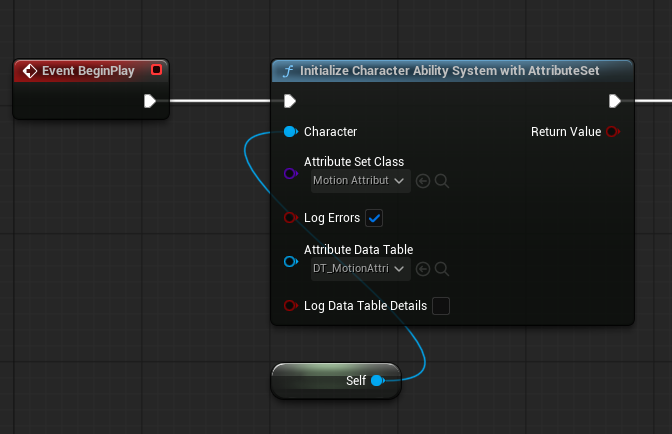
MotionPlayerState requires manual initialization from your Character class. Without calling InitializeAbilitySystem(this) from your Character's BeginPlay or PossessedBy, Motion components will not function. See Manual Initialization Examples below.
This requirement will hopefully be dropped in the future, once more feedback has been collected!
Requirements
- GameMode with PlayerStateClass set to
AMotionPlayerState - Gameplay Ability System plugin enabled
- Networked multiplayer setup (works in single-player too)
- Manual initialization required from Character class
- Included Components:
- AbilitySystemComponent (owned and replicated)
- MotionAttributeSet (created with default values)
- Avatar actor management for character possession
- Delegate system for component synchronization
Installation
- Open your GameMode Blueprint or C++ class
- Set
PlayerStateClasstoAMotionPlayerState::StaticClass() - The PlayerState will be automatically created for each player
- IMPORTANT: Add manual initialization to your Character class:cpp
// In Character's BeginPlay() or PossessedBy() if (AMotionPlayerState* MotionPS = GetPlayerState<AMotionPlayerState>()) { MotionPS->InitializeAbilitySystem(this); } - Motion components will then find and use the initialized ASC
- Without step 4, Motion components will not work

Functionality
MotionPlayerState manages the AbilitySystemComponent lifecycle and ensures persistence across character respawns.
Player State Initialization Flow
Network Synchronization Flow
Virtual Functions
Core PlayerState Functions
| Function | Parameters | Return Type | Description |
|---|---|---|---|
PostInitializeComponents() | None | void | Override to add additional components or setup |
BeginPlay() | None | void | Override to setup initial state and load player data |
GetLifetimeReplicatedProps() | TArray<FLifetimeProperty>& OutLifetimeProps | void | Configure replication properties for networking |
Ability System Interface Functions
| Function | Parameters | Return Type | Description |
|---|---|---|---|
GetAbilitySystemComponent() | None | UAbilitySystemComponent* | Get the owned AbilitySystemComponent (implements IAbilitySystemInterface) |
InitializeAbilitySystem() | AActor* InAvatarActor | void | Initialize the ASC with specified avatar actor (typically the character) |
Blueprint Events
| Event | Parameters | Description |
|---|---|---|
| OnAbilitySystemInitialized | UAbilitySystemComponent* AbilitySystemComponent | Fired when ASC is initialized and ready for use |
Configuration Properties
Core Components
| Property | Type | Replication | Description |
|---|---|---|---|
| AbilitySystemComponent | UAbilitySystemComponent* | Replicated | The owned ASC instance (auto-created in constructor) |
| AvatarActor | AActor* | Local | Cached reference to the avatar actor (typically the character) |
Blueprint Events
| Property | Type | Description |
|---|---|---|
| OnAbilitySystemInitialized | FOnAbilitySystemInitialized | Dynamic multicast delegate fired when ASC is ready |
Read-Only State Properties
Initialization State
| Property | Type | Description |
|---|---|---|
| Avatar Actor | AActor* | Current character using this ASC |
| ASC Initialized | bool | Whether the ASC has been initialized with an avatar |
| Motion Attribute Set | UMotionAttributeSet* | Auto-created attribute set with default values |
GameMode Setup
// C++ GameMode
AMyGameMode::AMyGameMode()
{
    PlayerStateClass = AMotionPlayerState::StaticClass();
}// Blueprint GameMode
Class Defaults → Player State Class → MotionPlayerStateASC Initialization Flow
- PlayerState Created - When player joins game
- ASC Component Created - In constructor with MotionAttributeSet
- Character Spawns - Character class created and possessed
- IMPORTANT: - Character must call
InitializeAbilitySystem(this) - ASC Initialized with Avatar - Character becomes avatar actor
- Fire Delegate - Notify Motion components via
OnAbilitySystemInitialized - Components Bind - Motion components connect to initialized ASC
Persistence Across Respawns
The PlayerState pattern ensures:
- Attributes persist through death
- Abilities remain available
- Effects continue or pause appropriately
- No data loss on respawn
Advanced Features
Multiplayer and Networking
Replication Strategy
// Automatic replication setup in GetLifetimeReplicatedProps
void AMotionPlayerState::GetLifetimeReplicatedProps(TArray<FLifetimeProperty>& OutLifetimeProps) const
{
    Super::GetLifetimeReplicatedProps(OutLifetimeProps);

    // AbilitySystemComponent is replicated to all clients
    DOREPLIFETIME(AMotionPlayerState, AbilitySystemComponent);
}
Authority and Prediction
- Server Authority: All gameplay effects and ability activations validated on server
- Client Prediction: Immediate response with server correction
- Rollback Support: Automatic correction for mispredicted actions
- Persistence: PlayerState survives character death/respawn
Network Optimization Features
- Efficient Delta Compression: Only changed attributes replicated
- Attribute Caching: Client-side caching for performance
- Conditional Replication: Relevancy-based attribute updates
- Bandwidth Management: Configurable replication frequency
ASC Lifecycle Management
Component Integration Pattern
Motion components use a sophisticated binding pattern that handles both immediate and delayed initialization:
// ASC discovery in Motion components (handles manual initialization timing)
void UMotionComponent::BeginPlay()
{
    Super::BeginPlay();

    // Try immediate binding (if Character already called InitializeAbilitySystem)
    if (AMotionPlayerState* PS = GetPlayerState<AMotionPlayerState>())
    {
        if (UAbilitySystemComponent* ASC = PS->GetAbilitySystemComponent())
        {
            if (ASC->GetAvatarActor()) // Check if manually initialized
            {
                BindToAbilitySystem(ASC);
                return;
            }
        }

        // Wait for manual initialization via delegate
        // This fires when Character calls InitializeAbilitySystem()
        PS->OnAbilitySystemInitialized.AddDynamic(this, &UMotionComponent::OnAbilitySystemReady);
    }
}
Integration with Motion Components
Motion components handle ASC integration gracefully:
- Find MotionPlayerState via character
- Access AbilitySystemComponent (created automatically)
- Check if ASC is initialized (requires manual
InitializeAbilitySystem()call) - If not initialized, register for
OnAbilitySystemInitializeddelegate - When delegate fires, bind to ASC and apply gameplay effects
- Monitor attribute changes during gameplay
Requirements: Character must call MotionPlayerState->InitializeAbilitySystem(this) for components to function.
Common Usage Patterns
Accessing the ASC
// From Character
AMotionPlayerState* PS = GetPlayerState<AMotionPlayerState>();
UAbilitySystemComponent* ASC = PS->GetAbilitySystemComponent();

// Via Interface
IAbilitySystemInterface* ASI = Cast<IAbilitySystemInterface>(PlayerState);
UAbilitySystemComponent* ASC = ASI->GetAbilitySystemComponent();
Listening for Initialization
// Bind to delegate
PlayerState->OnAbilitySystemInitialized.AddDynamic(this, &AMyClass::OnASCReady);

// Handler
void AMyClass::OnASCReady(UAbilitySystemComponent* ASC)
{
    // ASC is now initialized with avatar
}
Blueprint Access
Get Ability System Component
├── Target: Motion Player State
└── Return: Ability System Component

Event On Ability System Initialized
├── Ability System Component (output)
└── [Your initialization logic]
Debugging and Troubleshooting
Console Commands
Enable comprehensive logging for debugging:
# Motion system logging
log LogMotionPlayer Verbose
log LogMotionCore Verbose

# Ability system logging
log LogAbilitySystem Verbose
log LogGameplayEffects Verbose
log LogGameplayTags Verbose

# Attribute debugging
showdebug abilitysystem
Common Issues and Solutions
ASC Not Initialized (Most Common)
Problem: Motion components waiting indefinitely, no gameplay effects working
Symptoms: Components show "waiting for ASC" in logs, attributes don't sync
Solution:
// Add manual initialization to your Character class
void AMyCharacter::BeginPlay()
{
    Super::BeginPlay();

    // CRITICAL: This call is required for Motion to work
    if (AMotionPlayerState* MotionPS = GetPlayerState<AMotionPlayerState>())
    {
        MotionPS->InitializeAbilitySystem(this);
    }
}
ASC Not Found
Problem: Motion components can't find AbilitySystemComponent
Solution:
// Verify GameMode configuration
AMyGameMode::AMyGameMode()
{
    PlayerStateClass = AMotionPlayerState::StaticClass(); // Must be set
}
Attributes Not Syncing
Problem: Attribute changes not replicating to clients
Solutions:
- Verify server authority for all gameplay effect applications
- Ensure
InitializeAbilitySystem()was called on server - Check network relevancy settings
- Ensure proper OnRep function implementation
Components Not Binding
Problem: Motion components not connecting to ASC
Solutions:
- Check manual initialization: Ensure Character calls
InitializeAbilitySystem() - Check initialization timing in BeginPlay vs PossessedBy
- Verify delegate binding for late initialization
- Ensure character has MotionPlayerState reference
### Debugging Blueprint Nodes
```blueprint
# Check PlayerState type
Get Player State → Cast to Motion Player State

# Verify ASC initialization
Event On Ability System Initialized → Print String ("ASC Ready")

# Monitor attribute changes
Event On Attribute Changed → Print String (Attribute Name + New Value)