Appearance
Use a MetaHuman
Use this procedure to add a MetaHuman to a Motion 1.6 character Blueprint.
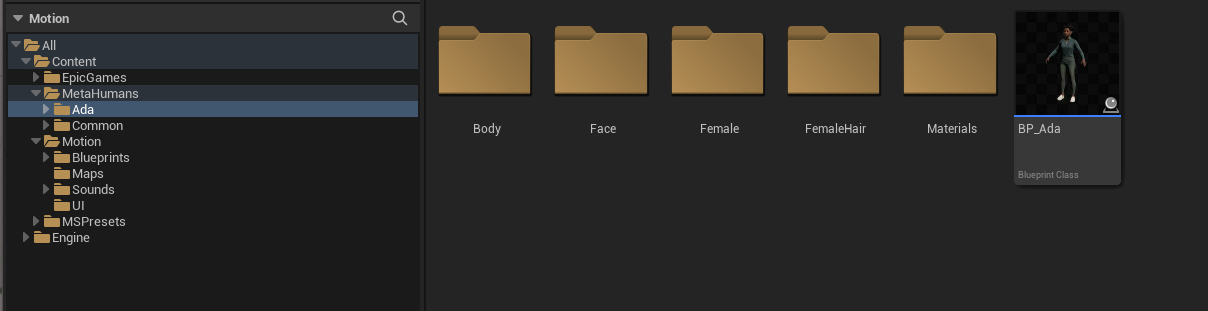
Import the MetaHuman
- In Unreal Editor, select
Window > Quixel Bridge. - Select the MetaHuman.
- Download and import it.
- Accept the requested project setting changes.
- Restart Unreal Editor.
Add the MetaHuman components
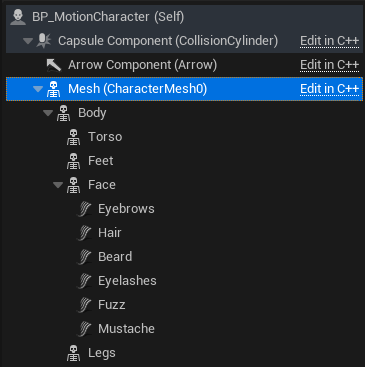
- Open the MetaHuman Blueprint and the Motion character Blueprint.
- Copy the MetaHuman body components.
- Paste them below
Meshin the Motion character Blueprint. - Restore the component hierarchy if it changed during the copy operation.
- Copy
LODSyncto the Motion character Blueprint.
Copy the MetaHuman Blueprint logic
- Copy
Enable Master Posefrom the MetaHuman Blueprint. - Paste it into the Motion character Blueprint.
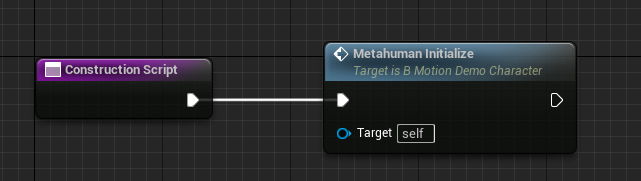
- Create functions named
MetahumanInitializeandMetahumanBeginPlay. - Copy the applicable MetaHuman Event Graph nodes into these functions.
- Do the same for the Construction Script logic.
- Omit Live Link and retarget nodes.
- Call
MetahumanInitializefrom the Motion character Construction Script. - Call
MetahumanBeginPlayfromBegin Play.
Create the retarget Animation Blueprint
- Duplicate
RTG_Mannequin_Motioninto project content. - Open the duplicate.
- Set
Target IKRig Assetto the MetaHuman rig. - Preview an animation and make sure that retarget movement is correct.
- Save and compile the retargeter.
- Open the MetaHuman body mesh.
- Create an Animation Blueprint for this mesh.
- Add
Retarget Pose From Meshto the AnimGraph. - Connect it to the Output Pose.
- Assign the retargeter duplicate.
- Compile and save the Animation Blueprint.
- Assign it to
Bodyin the Motion character Blueprint.
Open the retargeter at least one time before you do a PIE test. This action prevents initialization warnings in Motion 1.6.
Adjust Motion for the MetaHuman
- Adjust capsule half height and radius to the MetaHuman body.
- Adjust retarget rotation alpha values if the limbs deform incorrectly.
- Remove
FullBodyif the MetaHuman head must not produce shadows. - Enable
Owner No SeeonMesh (CharacterMesh0). - Set its tick option to
Always Tick Pose and Refresh Bones. - Enable
Owner No SeeandHidden Shadowon applicable hair and face components.
Start PIE. Make sure that the MetaHuman appears as the character and receives all Motion animations.
See the Epic Games MetaHuman retarget documentation for more information.